The Ekrano GX is a lovely piece of kit and Venus OS is genuinely open source. It still could not show this boat. Here's why, and what we built instead.
Victron earns its reputation
We run Victron for the conversion and charging on Exodus, and we'd do it again. The gear is honest about what it's doing, the settings are yours to change, and — unusually for marine electronics — the firmware is open source.
That last point matters more than the spec sheet. You can read Venus OS. You can modify it. People do, and Victron doesn't fight them. In an industry built on sealed boxes, that's rare enough to be worth paying for on its own.
A GX device with the screen already attached
Victron's GX devices are the brain of a Victron installation. They talk to the inverter, the solar chargers, the shunts and the batteries, pull it all together, and hand it to you on a screen or to VRM in the cloud.
The Ekrano GX is the one with the display built in — a GX device and a touchscreen in a single box, so there's no separate panel to find space for.
| Spec | Figure |
|---|---|
| Display | 7 inch touchscreen, 1024 × 600 |
| Brightness | 1000 cd/m², with an ambient light sensor that dims it automatically |
| Processor | Quad core — the most powerful GX device Victron have made |
| Size | 130 × 120 × 28 mm |
| Protection | IP54 from the front when mounted with the steel bracket |
| Firmware | Venus OS |
That brightness figure is the one to notice. 1000 cd/m² is a sunlight-readable screen. A tablet is typically a third of that, which is why a tablet at the helm on a bright day is a mirror.
Your GX device is already a Signal K server
Buried in the firmware menu is an image type called Large. Switch to it and your GX device comes back with Signal K and Node-RED pre-installed.
Read that again if you've just spent a weekend putting Signal K on a Raspberry Pi. The GX device sitting on your bulkhead will do it, and it's two menu taps:
What that buys you is enormous. Signal K means every Victron value — every cell, every amp, every solar string — becomes a standard, readable data path that any open-source tool can subscribe to. Node-RED means you can act on it: if this, then that, dragged together in a browser without writing code.
So if the question is "how powerful is Venus OS Large", the honest answer is: powerful enough that for a lot of boats it removes the need for a separate computer entirely.
One battery bank. That's the whole thing.
Venus OS models a boat as having one battery. Not one battery type — one bank.
You can connect as many shunts and battery monitors as you like. They all appear in the device list and you can read every one of them. But only one can be the system battery: the one on the main overview, the one shown in VRM, and the one whose numbers drive DVCC — the charge voltage limit, charge current limit and discharge current limit that govern the whole installation.
Everything else is a second-class citizen. You have to drill down through the device menus to find it, it isn't on the overview, and there is no coordination between banks. Victron's own documentation is straight about this, and the community workaround is a "battery aggregator" that fuses several banks into one fictional one so the overview has something to show.
For most boats that's fine. One house bank, one engine start battery, done. For a boat with two independent lithium banks at two different voltages, an AGM buffer, a start bank, a hotel buffer and six DC-DC converters moving charge between them — it falls apart. There is no single number that describes the state of this boat.
That isn't a criticism of Victron so much as a description of what the product is for. We just happened to build something it wasn't for.
One page, every bank, drawn the way the boat is actually wired
This is the point a screenshot can't make: it is not a picture of the boat, it is the boat. Those lines move because the current is moving. Stop a charger and its line stops.
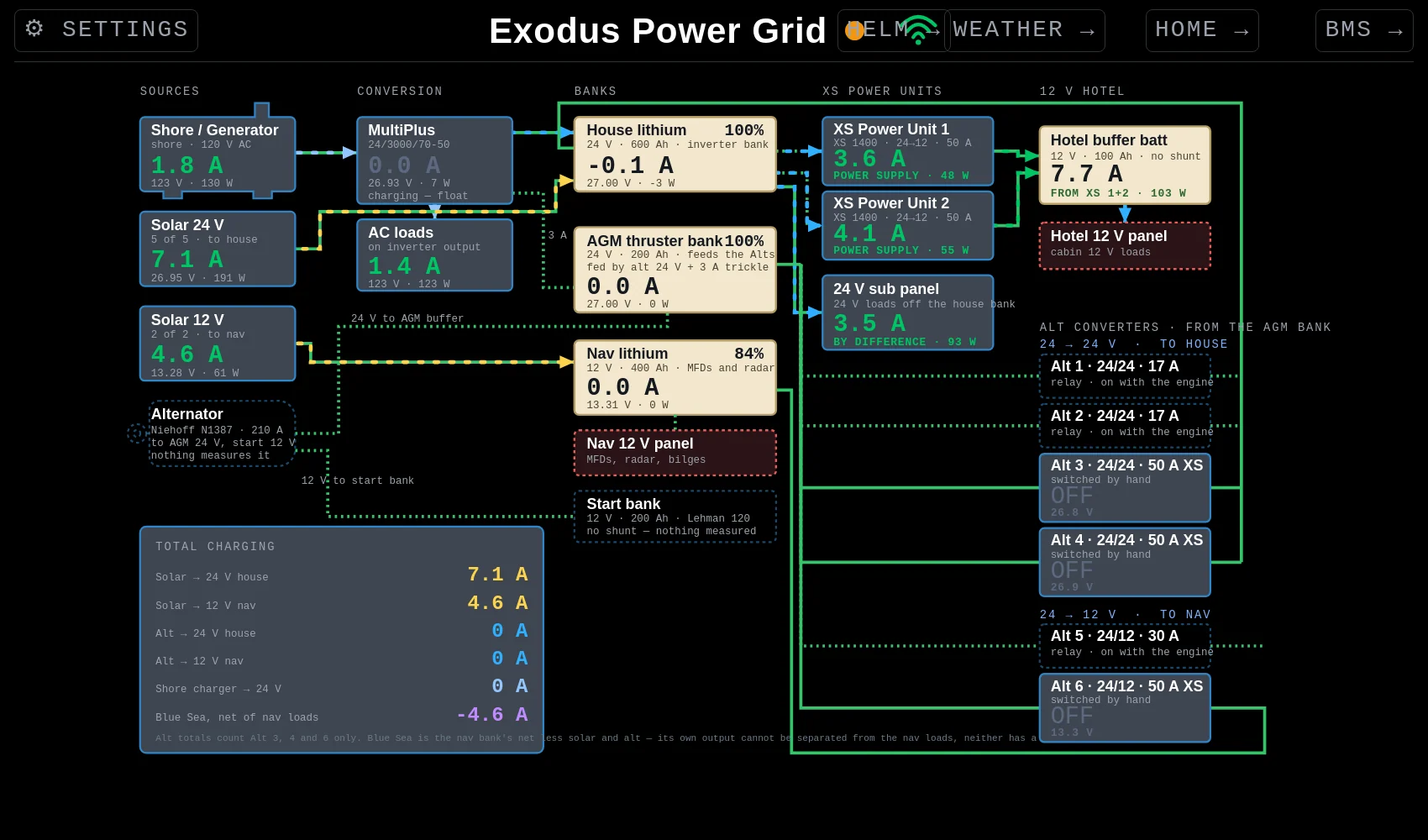
The live page, as it looked the morning this was written. Everything green or yellow is a real measured number.
It's a single-line diagram — the drawing an electrician would make of the boat — with live numbers written onto it. Power flows left to right. You read it like a river.
Everything that can put energy into the boat. Shore power or the generator, the 24 volt solar array, the 12 volt solar array, and the alternator. Each box shows amps, volts and watts as measured, not as rated.
The alternator box is drawn with a dashed outline, and it says nothing measures it. That's deliberate. An unmeasured thing should look different from a measured thing, so you never mistake a guess for a reading.
The MultiPlus, and the AC loads hanging off its output. This is where shore and generator power becomes DC, and where DC becomes mains for anything aboard that wants it.
The four stores of energy, each with its state of charge, its voltage and whether it is charging or discharging right now. A negative current means it's giving, a positive one means it's taking. The dashed boxes underneath are the distribution panels those banks feed.
The DC-DC converters that move charge between banks, each showing whether it's on or off, what it's passing, and how it's switched — some come on automatically with the engine, some are switched by hand. Then the 12 volt hotel side at the far right.
Bottom left: every charging path added up in one place. How much solar is reaching the house bank, how much is reaching the nav bank, what the alternator is contributing, what the shore charger is doing.
And at the bottom of that box, in small grey text, the caveats — which converters are counted in the alternator total, and why one of the figures can't be separated out. The honesty is part of the design. A dashboard that hides its own uncertainty is worse than no dashboard, because you'll believe it.
Victron's remote portal is genuinely excellent
Everything above is about where Victron stopped being enough for this particular boat. It would be dishonest to leave it there, because one part of what they do is better than anything we have built.
VRM is Victron Remote Management — a free portal your GX device uploads to. Open a browser anywhere in the world, log in, and you are looking at your installation.
For most boats that is the whole problem solved, free, with no setup beyond connecting the GX device to the internet. It is a remarkable thing to get for nothing with a battery charger.
Because VRM can only show you Victron.
It is the best portal in the industry for one manufacturer's gear. It is not, and was never meant to be, a picture of your whole boat. It does not know about your JK BMS cells. It does not know what your radar is painting, what the depth is, what the masthead wind is doing, how much the boat heaved last night, or how far you went today. And it still models your boat as having one battery.
Victron is mighty powerful gear. What we have built here is not better Victron — nothing is. It is something Victron was never trying to be: one screen that knows the entire boat.
Power, batteries, every cell, wind, depth, heading, radar, sonar, sea state, temperatures, the weather, the log book. From a dozen manufacturers who don't talk to each other, on one page, on hardware that cost less than a single marine display.
And the gap is closing in one direction only. Every month something else gets added to our side. Victron's one-bank model is not going to change, because for their market it doesn't need to.
Nothing exotic
Signal K on a Raspberry Pi holds all the data. Victron gear, NMEA 2000 shunts and the JK BMS units all feed into it. The page itself is a plain web page — no app, no cloud account — served off the Pi and opened on whatever screen is nearest. The helm display, a phone in the cockpit, a laptop at the chart table.
Because it's a web page, adding a bank means adding a box. There is no product limitation to work around. That is the entire argument for open source on a boat, in one sentence.
 Exodus